
This addon includes AI-generated content and/or AI-assisted code. Learn More.
Tyrian Codex
Guild Wars 2 companion: leveling / map-completion guide, 3D nav, dashboard, HUD, info panel, items & journal.
| Downloads | 3.9k |
| Visibility | Public |
| Updated | 19 days ago |
| Created | 3 months ago |
| ID | 124 |
| Signature | 0x54434458 |
Contributors
Tyrian Codex
Tyrian Codex is a Guild Wars 2 Nexus addon. The goal was to make a complete in-game toolkit for navigation, map completion, story and instance guidance, account progress, collections, inventory, economy, event timers, farming, fishing, with configurable UI panels.
The addon reads live position and map state through MumbleLink, and optionally reads your account through the official Guild Wars 2 Web API. It does not automate gameplay or change your account. API access is read-only.
Quick Start
- Install Nexus for Guild Wars 2.
- Download the latest Tyrian Codex release.
- Extract the release so the files end up here:
TyrianCodex.dll->/addons/TyrianCodex.dlldata/->/addons/TyrianCodex/data/
- Launch Guild Wars 2 and enable Tyrian Codex in Nexus.
- Open Tyrian Codex from the Nexus addon list, QuickAccess tray, HUD bar, or the addon's own settings window.
Tyrian Codex works without an API key for route guidance, static map data, world markers, Atlas search, the item catalog, event timers, the wiki reader, and many overlay features. Adding an API key makes the addon account-aware.
What It Does
Tyrian Codex provides several major feature groups:
- Open-world route guidance for map completion and leveling.
- Instance and story route guidance for bundled dungeon and story instance paths.
- GPS navigation with an in-world arrow, ground trail, in-world markers, and map/minimap route lines.
- Smart travel help for known waypoints, waypoint chat links, personal targets, and closer-waypoint offers.
- Account-aware progress for characters, story, dailies, wallet, inventory, collections, Trading Post, WvW, and more when an API key is present.
- Search and reference tools for locations, items, skins, cosmetics, recipes, fishing, homestead unlocks, and wiki pages.
- Economy tools including Trading Post delivery/order views, item price tooltips, flip finder, crafting cart, and price charts.
- Configurable overlay surfaces including the guide panel, dashboard, HUD launcher bar, info data bar, notifications, and zone-entry banners.
- Per-character profiles and loadouts so each character can have its own UI setup.
Main Window Tabs
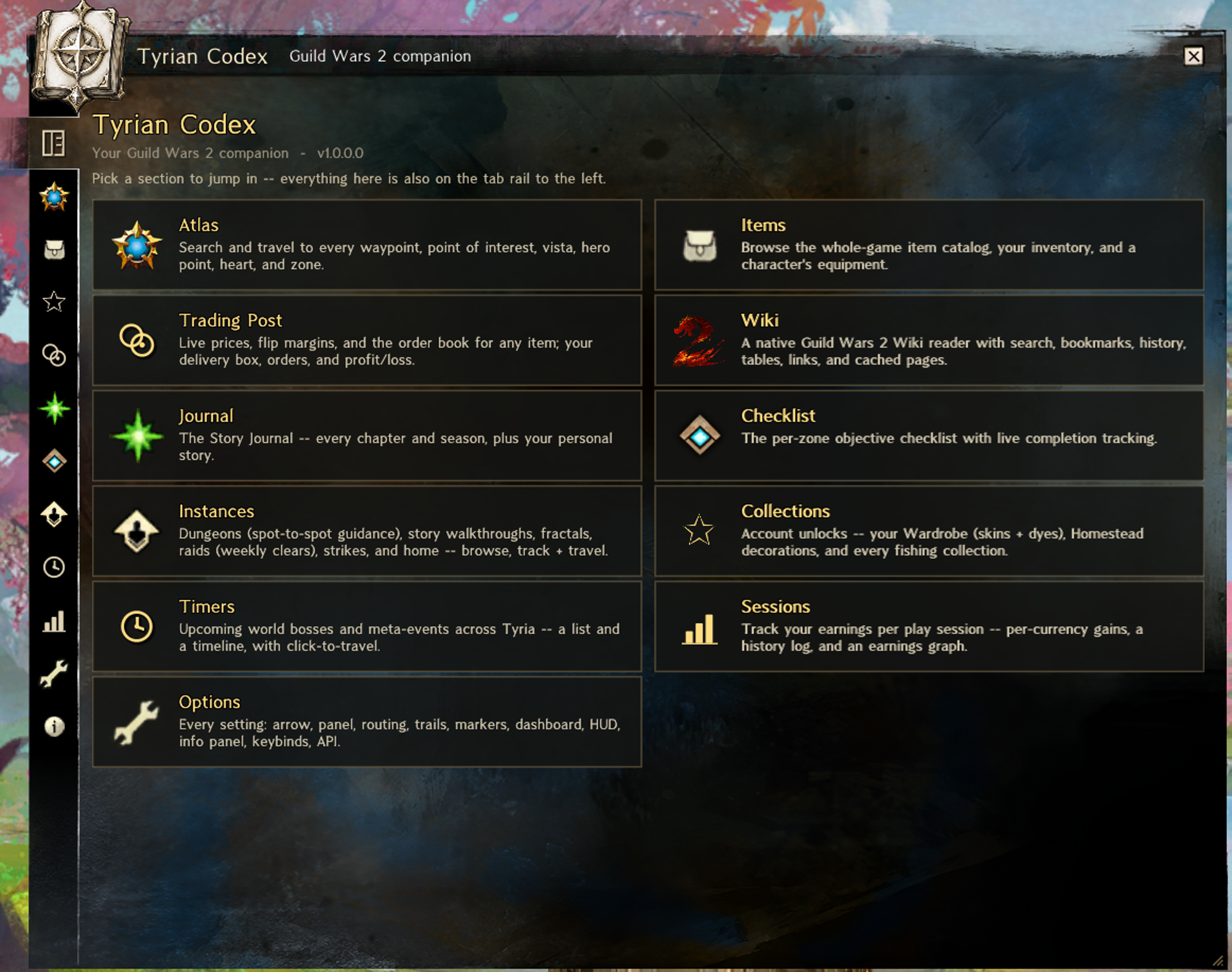
The main Tyrian Codex window is organized into user-facing tabs:
| Tab | What it is for |
|---|---|
| Hub | Landing page with quick cards for the major sections. |
| Atlas | Searchable database of zones, waypoints, POIs, vistas, hero points, hearts, and map places. Includes travel, show-on-map, copy, and hover map previews. |
| Items | Whole-game item catalog, owned inventory browser, and equipment view. |
| Collections | Wardrobe, Homestead, Fishing, mounts, gliders, skiffs, jade bots, novelties, finishers, mail carriers, minis, titles, emotes, and recipes. |
| Trading Post | Delivery box, open orders, flip finder, crafting cart, and price-history charts. |
| Journal | Story Journal style view plus per-character My Story when API data is available. |
| Checklist | Release, region, zone, and objective tree with search and manual completion control. Helps the addon know what waypoints and things you've already completed. |
| Instances | Dungeons, story instances, fractals, raids, strikes, and home content progress. Routes are shown where bundled route data exists. |
| Timers | Global event board with list and timeline views, filters, and click-to-guide behavior. |
| Sessions | Current session tracker, currency changes, level/objective gains, saved session history, and simple earnings graphs. |
| Options | Searchable settings for every major feature and overlay surface. |
| About | Data sources, credits, and third-party notices. |
Navigation And Guidance
The guide is built around the current map, your character, and the selected route mode.
- Guide panel shows the current objective, upcoming steps, zone progress, task details, route controls, travel actions, and optional event/farming panels.
- GPS arrow points toward the current target, route entrance, or trail direction depending on route mode.
- Ground trail draws the active route in the world. Styles include footprints, arrows, dashed, line, and dots.
- Map and minimap trails draw the route and pins on the in-game map and compass.
- World markers can show waypoints, POIs, vistas, hero points, hearts, dungeon markers, gathering nodes, fishing holes, and personal targets.
- Auto-complete on arrival can mark most objectives complete when you get close enough. You can also mark done, undo, reset, and manually manage checklist progress.
Route modes:
- Trail follows the authored route in order.
- Hybrid Trail follows the authored route, then hands off to the objective using the trail approach.
- Hybrid Nearest routes to the nearest unfinished objective using the trail approach.
- Direct Trail targets the authored next objective by straight-line direction.
- Direct Nearest targets the nearest unfinished objective by straight-line direction.
For maps that have both variants, Path: On Foot or Mount changes which route the guide uses. Hybrid modes can also show a direct-objective glow so you know where the final target is while still being guided along the route entrance.
Travel assistance never bypasses Guild Wars 2's own confirmation. Tyrian Codex can open or pan the map and, if enabled, click a confirmed waypoint to bring up the game's normal teleport prompt. But, you must personally confirm the teleport.
Instances, Farming, And Fishing
The instance system uses bundled route files for dungeons and supported story instances. When you enter a supported instance, Tyrian Codex can load the matching path, show route instructions, draw the trail, and aim the arrow along the route to the next marker.
Farming support appears on maps that have bundled gathering data:
- Filter by all nodes, ore, wood, plants, seafood, mixed routes, or event nodes.
- Hide or show specific material types per map.
- Start a gathering run that targets the nearest enabled, not-yet-gathered node.
- Show gathering nodes in the world, on the map, or on the minimap.
Fishing support includes:
- Fishing collection browser with caught/uncaught state.
- Time, bait, hole, region, power, and catchable-now filters.
- Navigation to fishing maps and holes.
- In-world and map/minimap fishing-hole overlays.
- Fish runs that route to matching, not-yet-visited holes.
Account And API Key
An API key is optional. Without one, the addon still has static game data, route guidance, Atlas search, timers, wiki lookup, and manual progress. With one, you unlock the full power of the addon and it can show account-specific data.
Create a key at account.arena.net -> Applications, then paste it in Options -> Account / API or the welcome window.
Recommended scopes:
| Scope | Unlocks |
|---|---|
account |
Account basics, playtime, home world, Wizard's Vault daily/weekly objectives, and part of story auto-completion. |
characters |
Character list, levels, bag space, equipment, active-character support, and better zone recommendations. |
progression |
Story completion, achievement points, masteries, luck, raid/dungeon clears, and daily completion data. |
inventories |
Bank, material storage, shared inventory slots, and character bags. |
wallet |
Currencies, wallet widgets, session earnings, and economy data texts. |
tradingpost |
Delivery box, open buy/sell orders, and Trading Post widgets. |
unlocks |
Skins, dyes, minis, recipes, cosmetics, collections, Homestead unlocks, glyphs, and cats. |
wvw |
WvW team assignment and live match widgets such as score, skirmish, PPT, K/D, and objective control. |
The key is stored locally in settings.json under /addons/TyrianCodex/. Nexus does not provide a secret vault, so use a least-scope key if you only want some features.
Overlay Surfaces
Tyrian Codex is not just one window. Most features can be used via multiple overlay windows:
- Guide panel: current objective, checklist, route controls, farming/events, and rich objective details.
- GPS arrow: floating navigation arrow with right-click actions.
- Dashboard: edge-docked slide-out widget panel with notifications, objectives, events, route arrow, recommended zones, wallet, Trading Post, inventory, WvW, and more.
- HUD bar: top or bottom icon bar with clock and quick access to major tabs.
- Info Panel: configurable data-text strip for route status, clocks, currency, session earnings, location, WvW, bags, bank, crafting cart, loadouts, and other live values.
- Notifications: configurable toasts for zone, travel, action, event, and info messages.
- Zone Display: animated region/zone/area banner when entering maps or crossing named areas.
- Wiki reader: in-addon wiki viewer with native HTML rendering without leaving the game.
- QuickAccess tray menu: GW2-styled popup for common actions and toggles.
Each surface has its own placement, visibility, scale, behavior, and layout settings. The Info Panel can be full-width or a shorter strip, with horizontal and edge offsets per profile.
Profiles, Loadouts, And Keybinds
The Options tab is searchable and grouped by feature:
General, GPS Arrow, Guide Panel, Routing, Route Trail, Map Trails, Markers, Notifications, Zone Display, Widgets, Dashboard, HUD, Info Panel, Loadouts, Wiki, Account / API, Keybinds, and Diagnostics.
Several setting groups are profile-based:
- General profiles
- Dashboard profiles
- Info Panel profiles
- HUD profiles
Profiles are saved per character. Loadouts bundle the active profile from each of those areas, allowing one-click or keybound swaps between whole UI setups such as leveling, combat, WvW, or minimalist layouts. Profiles/loadouts can be imported and used across characters.
Available keybinds include guide toggle, mark current step done, undo/back, copy waypoint, cycle/apply loadouts, reannounce zone display, toggle markers, and toggle trail.
Local Data And Saved Files
Runtime data and user data live under /addons/TyrianCodex/.
Important saved files include:
settings.json: options, API key, profiles, layouts, loadouts, and keybinds.progress.json: per-character manual/objective completion.confirmed.json: waypoints physically reached by each character, used for travel decisions.story-account.jsonandstory-characters.json: manual story completion marks.session-history.json: saved per-character session history.charlevels.json: cached character levels for faster recommendations.cache/: downloaded images, API cache, wiki cache, and other runtime cache files.data/: The bundled data and images. These get downloaded on first load of addon and may be updated with new versions.
Build From Source
Requirements:
- Windows
- CMake 3.20+
- MSVC toolset, such as Visual Studio 2019+ or Build Tools
Build:
cmake -S . -B build -A x64
cmake --build build --config Release
Output:
build/Release/TyrianCodex.dll
CMake uses FetchContent for the Nexus API headers, Dear ImGui v1.80, nlohmann/json, and litehtml. The bundled runtime data is committed under data/.
Developer convenience: if GW2_ADDONS_DIR exists, the post-build step attempts to copy the DLL and data/ into that Nexus addons folder. Unload or disable the addon in Nexus before rebuilding, otherwise Windows may keep the DLL locked.
Troubleshooting
The addon loads but data is missing. Check that data/ is installed at /addons/TyrianCodex/data/, not beside the DLL as a loose sibling folder with the wrong path.
Account widgets say "Needs API Key" or keep loading. Verify the key in Options -> Account / API and make sure it has the scopes needed by that feature.
Route, marker, or map visuals are too noisy. Use Options -> Route Trail, Map Trails, and Markers to control trail style, distance fade, map/minimap drawing, objective pins, gathering pins, fishing pins, marker types, and combat fade.
Travel help is more automatic than you want. Use Options -> Routing to disable auto-travel sources, waypoint clicking after map pan, or chat-link travel detection.
A per-character setup looks wrong after changing characters. Check the profile selector in Options -> General, Dashboard, HUD, and Info Panel. Diagnostics also includes per-character stored-data maintenance.
Source build copies fail. Unload Tyrian Codex in Nexus before rebuilding. A loaded DLL cannot be overwritten reliably.
Data Sources And Credits
Tyrian Codex combines public Guild Wars 2 data, community marker packs, reference projects, open-source libraries, and addon-specific generated datasets.
- ArenaNet: Guild Wars 2, the official API, map tiles, game icons, interface fonts, wiki/API reference data, and the game data Tyrian Codex builds on.
- Nexus / RaidcoreGG: the addon framework that lets Tyrian Codex run inside Guild Wars 2.
- Blish HUD: UI design ideas, addon interaction patterns, and implementation methods used as reference for a Nexus-native experience.
- Lady Elyssa: route trails, markers, trail art, and gathering data.
- Tekkit: route trails and marker-pack data used by open-world and farming routes.
- QuitarHero: route and marker-pack data used by some trails and gathering paths.
- Metallis: farming and fishing data, including fishing-hole locations.
- SZG5: dungeon trails and markers.
- Immortius: Wardrobe unlock data from the GW2 Wardrobe Unlock Analyser.
- GW2StoryTimes.com: community story completion-time estimates.
- GW2dat: Guild Wars 2 asset references used by some icons and visual assets.
- Guild Wars 2 Wiki contributors: wiki article content, objective descriptions, and reference material rendered in the in-addon wiki reader.
- MSCHF: Times Newer Roman font used by the wiki quote styling.
- ProperDave and ArenaNet: New Krytan font used by Tyrian Codex's Krytan-styled zone-display effects.
- litehtml and Gumbo: native HTML and CSS parsing/rendering stack used by the in-addon wiki reader.
- Dear ImGui: immediate-mode UI layer used by Nexus addons and Tyrian Codex's custom GW2-styled controls.
- nlohmann/json: JSON parsing of settings, bundled datasets, and API-derived data.
License
Tyrian Codex's original source code is licensed under the GNU Lesser General Public License v3.0. See LICENSE and LICENSE-GPL-3.0, subject to any additional permissions stated in the project's license notices.
The LGPLv3 does not apply to third-party materials distributed with or used by Tyrian Codex. These materials include, without limitation, Guild Wars 2 icons, map tiles, user-interface assets, fonts, API-derived content, wiki-derived text, and community-provided marker data.
Each third-party material remains subject to the copyright, license, attribution requirements, trademarks, and other rights of its respective owner or contributor. Inclusion of third-party material in this project does not relicense that material under the LGPLv3 and does not imply ownership by the Tyrian Codex contributors.
Guild Wars, Guild Wars 2, ArenaNet, and their associated names, logos, artwork, and game content are trademarks or intellectual property of their respective owners. Tyrian Codex is an unofficial community project and is not affiliated with or endorsed by ArenaNet or NCSOFT.
AI Disclaimer: Parts of this was made with various AI tools to speed development time.