
GW2 Addon Managers Compared: Nexus, Blish HUD, ArcDPS & More
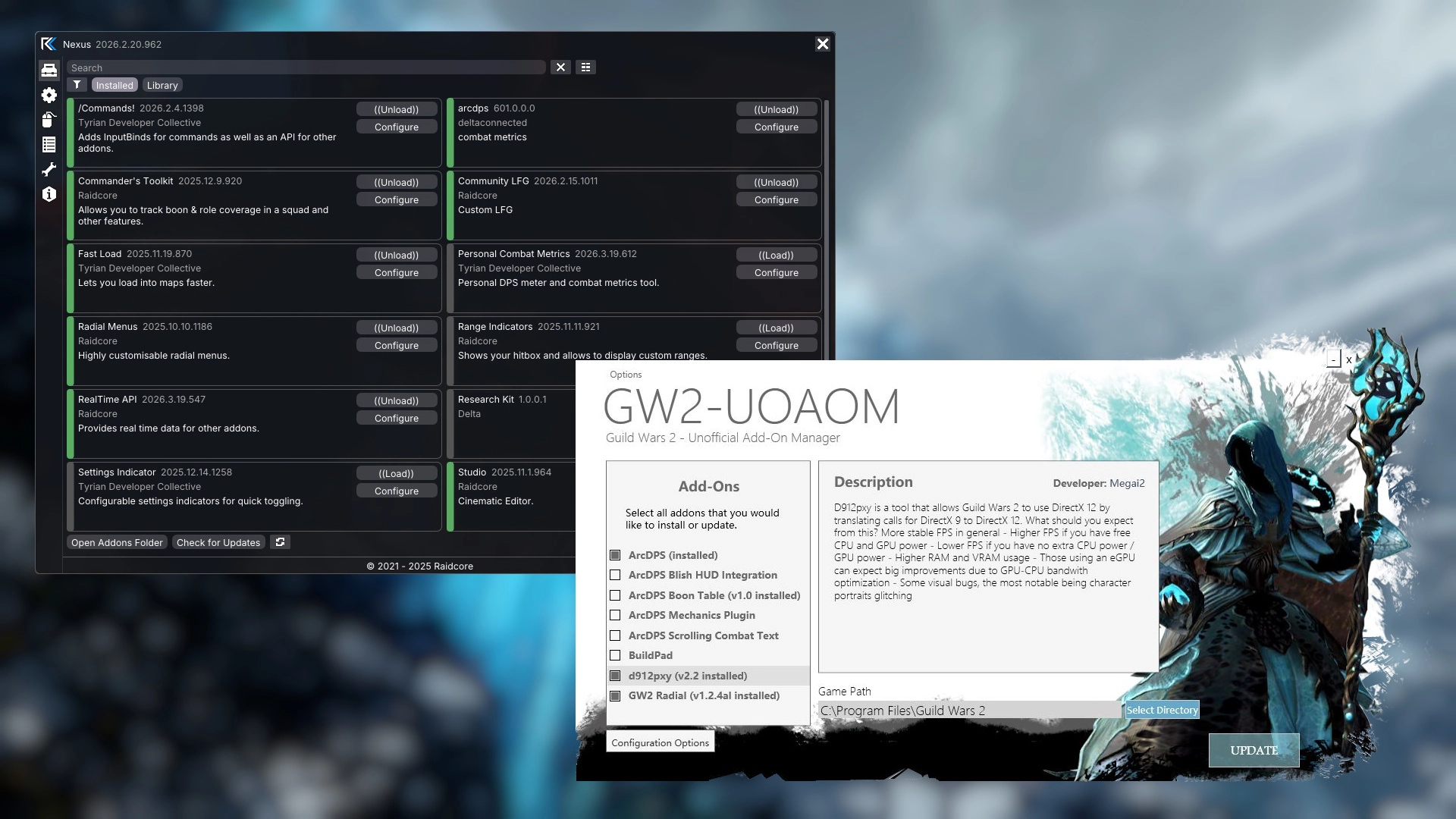
Guild Wars 2 has several community tools for installing, loading and building addons. They are often mentioned together, but they solve different problems: some host their own addon ecosystem, one focuses entirely on combat data, and some only install files. This guide compares Nexus, Blish HUD, ArcDPS, Simple Addon Manager (SAM) and the Unofficial GW2 Addon Manager (UOAOM), so you can decide which ones fit your setup. Many players use more than one.
Nexus is developed by Raidcore, the team behind this site. We have aimed to describe every tool fairly and accurately. If you spot something outdated or incorrect, please let us know.
Comparison at a glance
| Feature | Nexus | Blish HUD | ArcDPS | Simple Addon Manager (SAM) | Unofficial GW2 Addon Manager (UOAOM) |
|---|---|---|---|---|---|
| Type | Overlay, manager and framework | Overlay, manager and framework | Combat overlay and combat API | External addon manager | External addon manager |
| Where does it run? | Inside the game process | External application with an in-game overlay | Inside the game process | External application | External application |
| In-game interface | Yes | Yes | Yes | No | No |
| Addon ecosystem | Nexus addons and the ArcDPS extension ecosystem | Blish HUD modules | ArcDPS extensions and integrations | ArcDPS, supported ArcDPS extensions and GW2Radial | ArcDPS, supported ArcDPS extensions and GW2Radial |
| Installation and updates | Fully managed in-game, with automatic updates requiring no user input | Fully managed in-game with notifications for available updates | Can update itself and its extensions, but most extensions do not implement the built-in update mechanism [1] | Installs and updates supported addons when the user opens the manager and manually triggers an update | Installs and updates supported addons when the user opens the manager and manually triggers an update |
| Runtime addon loading (hot-loading) | Yes | Yes; for Blish HUD modules | No [2] | No | No |
| Developer API | Yes; lifecycle, events, keybindings and shared resources, ArcDPS data | Yes; .NET module API | Yes; combat data and plugin integrations | No | No |
| Game data integration | Yes; MumbleLink, GW2 API and supported integrations | Yes; MumbleLink, GW2 API and supported integrations | Yes; combat data and combat logging | No | No |
| Typical use cases | Deep customisation, markers, navigation, overlays and utility modules | Markers, navigation, overlays and utility modules | Damage, boon and encounter analysis | Installing and updating ArcDPS, supported extensions and GW2Radial | Installing and updating ArcDPS, supported extensions and GW2Radial |
| Runs on Linux? | Yes | No [3] | Yes | No | No |
| Performance impact [4] | Low | Medium | Low - Medium | Does not run alongside the game | Does not run alongside the game |
| Maintenance status | Actively maintained | Actively maintained | Actively maintained | Unknown | Unmaintained |
| Available addons | 100+ | 100+ | ~10 | ~10 | ~10 |
| Source code | Source-available[5] | Open source | Closed source | Closed source | Open source |
- [1] ArcDPS can update itself and extensions that implement its update interface. Most extensions do not implement this mechanism and instead rely on their own update processes or manual updates.
- [2] ArcDPS exposes an API capable of loading extensions at runtime. However, most extensions are not designed for this workflow, and ArcDPS does not provide a general user-facing mechanism for loading and unloading extensions on demand.
- [3] Blish HUD may be run on Linux with workarounds, but Linux is not officially supported.
- [4] Ratings reflect each tool's base overhead. Nexus runs inside the game and uses the game's existing window, device and render loop, so it adds very little on its own. Blish HUD runs as a separate process that renders its overlay with a full game framework (MonoGame) in its own window, which has a noticeably higher base cost. Every addon or module you load adds to these figures. ArcDPS runs just like Nexus using the game's resources, but combat processing and display can have performance impacts in very long or big fights. It is important to note that adding specific addons or just more in general will also have a performance impact.
- [5] No external code contributions, but suggestions and feedback are welcome. The tool is developed in public with open community discussions.
Understanding the differences
The five tools fall into three broad groups.
- Addon loaders and frameworks (Nexus, Blish HUD) host their own addon ecosystems, provide an in-game interface for managing them, and offer an API for developers. Nexus runs inside the game process. Blish HUD is a separate program that draws a transparent overlay window on top of the game.
- Specialised addons (ArcDPS) focus on one job. ArcDPS is a combat metrics tool, but it also exposes an extension API, so a whole ecosystem of combat-related extensions is built on top of it.
- Addon managers (SAM, UOAOM) are standalone Windows applications that download addon files into your game folder. You run them before playing, and they are not active while the game is running. They do not provide addons or an in-game interface of their own.
Running inside the game vs. alongside it
Where a tool runs has practical consequences. Tools that run inside the game process, like Nexus and ArcDPS, use the game's existing window and renderer and draw directly into its frame. They do not need their own window, render loop or process, so their base overhead is very low, they work in every display mode, and they can react to the game immediately. The trade-off is that a faulty addon can crash the game, since everything shares one process.
Blish HUD runs as its own process. If Blish HUD or one of its modules crashes, the game keeps running. In return, it renders its overlay with a full game framework (MonoGame) in a second, transparent window on top of the game. This needs its own CPU, GPU and memory resources even before any modules are loaded, and it requires the game to run in windowed or windowed fullscreen mode. It reads game state through MumbleLink and the official GW2 API rather than from inside the game.
Nexus vs. Blish HUD
Nexus and Blish HUD are the most similar tools in this comparison. Both host large addon ecosystems with markers, navigation aids, timers, overlays and quality-of-life utilities. The main differences are in how they run and how their addons are built.
Ecosystems and features
Blish HUD has a long-established catalogue of modules, including Pathing, a widely used module for TacO-format marker packs. Nexus has its own growing library of addons and can also load ArcDPS and its extensions, so a single loader can manage most of your in-game addons. Many features exist in both ecosystems. When choosing, compare the specific addons or modules you want rather than the framework alone.
Performance and stability
Nexus piggybacks on resources the game already has: it draws into the game's own frame instead of creating a window, a render loop and a process of its own. Its base overhead is therefore minimal, although each addon still shares the game's process. Blish HUD runs a complete MonoGame-based renderer in a separate process, which makes it more resource-hungry from the start, especially on lower-end hardware. In exchange, a crash in Blish HUD does not take the game down with it. On either framework, heavy addons or modules add their own cost on top of this baseline.
Linux and Steam Deck
Guild Wars 2 runs on Linux and Steam Deck through Proton or Wine. Since Nexus and ArcDPS load inside the game, they work in these environments as well. Blish HUD's separate overlay window does not officially support Linux, although community workarounds exist.
Nexus vs. ArcDPS
Addon loader vs. combat analysis
Nexus and ArcDPS are not competitors. ArcDPS is the community standard for combat analysis: it shows damage, boon uptime, squad statistics and encounter details, and can record combat logs. These logs can be parsed with tools such as Elite Insights and shared through log hosting sites like dps.report. Nexus is a loader and framework for addons in general. It does not replace ArcDPS, and ArcDPS does not replace an addon loader.
How they work together
ArcDPS can be installed on its own, and many players use it without any other tools. Nexus can also install and load ArcDPS and its extensions, so they are managed together with your other addons. The Nexus ArcDPS library lists the commonly used, publicly available ArcDPS extensions. Through Nexus's ArcDPS integration, Nexus addons can receive ArcDPS combat events, which lets developers build on combat data without writing an ArcDPS extension.
Nexus vs. SAM and UOAOM
Installing, updating and discovering addons
With SAM or UOAOM, you open the manager, choose from its list of supported addons and trigger an install or update. That list covers ArcDPS, a selection of ArcDPS extensions and GW2Radial. Between runs, nothing is updated. After a game patch, addons stay outdated until you open the manager again. SAM's maintenance status is unclear, so check its project page for recent activity before relying on it. UOAOM is no longer maintained, so its addon list and download sources may be out of date.
Nexus handles this inside the game. Its addon library lets you browse and install addons with one click, and installed addons are checked and updated automatically when you launch the game. Because developers publish to the library directly, new addons appear without waiting for a manager update.
In-game management and runtime loading
External managers place files on disk, and the game loads them at startup. Enabling, disabling or updating an addon means restarting the game. Nexus can load, unload and update its addons while the game is running, and gives addons shared features such as keybindings, a common settings interface and quick-access icons.
If you only use ArcDPS and a few extensions and prefer to have as little as possible running inside the game, an external manager or a manual install is still a valid choice. Just keep in mind that you are responsible for keeping everything up to date.
Using multiple tools together
Nexus, Blish HUD and ArcDPS can all be used together, and many players do. Nexus works with any setup, whether you also run Blish HUD, use ArcDPS on its own or through Nexus, or combine it with other overlays and tools. A few guidelines help avoid problems.
Avoiding conflicts
- Use one manager per addon. If both an external manager and Nexus manage the same addon, they can overwrite each other's files or install duplicate copies. This can cause crashes or load the same addon twice.
- Know what happens after a game patch. Nexus automatically disables volatile addons, meaning those that depend on game internals likely to change, when the game updates, and re-enables them once a compatible version is available. The game starts normally without any manual intervention. With standalone ArcDPS, SAM or UOAOM, an incompatible addon can crash the game until it is updated, and you may need to temporarily move its DLL out of the game folder to start the game.
- Do not remove Nexus to fix a crash. Many players are used to deleting
d3d11.dllfrom other loaders after a patch. With Nexus this is not necessary, and removing it disables all of your addons, including those that still work.
Developing extensions
Nexus addons
Nexus addons are native DLLs, typically written in C or C++ using the Nexus API headers. Community bindings exist for other languages, such as Rust. The API covers the addon lifecycle, events, keybindings, shared data such as MumbleLink and ArcDPS combat data, textures, and in-game UI. Because Nexus can reload addons at runtime, you can rebuild and test changes without restarting the game. Finished addons can be published to the Nexus addon library.
Blish HUD modules
Blish HUD modules are written in C# on .NET, using the Blish HUD SDK. Modules get access to MumbleLink, the GW2 API (including authenticated endpoints through the user's API key), and Blish HUD's own UI controls. For developers familiar with C#, this is a comfortable and well-documented environment. Modules are distributed through Blish HUD's module repository.
ArcDPS extensions
ArcDPS extensions are native DLLs that ArcDPS loads at startup. They receive combat events through callbacks and can draw their own windows inside ArcDPS's interface. This is the most direct way to work with combat data, but there is no central distribution channel. Users install extensions manually, through a manager, or through Nexus.
Security, trust and ArenaNet's policy
Where to get addons
Addons run on your computer with the same permissions as the game, which means they can access your files like any other program. Only download addons from sources you trust, such as the developer's official website or repository, or a curated library. Be careful with re-uploads and unofficial mirrors. Curated libraries reduce risk but are not a guarantee, so the developer's reputation and, where available, public source code are still worth checking.
Some addons and modules ask for a GW2 API key. Create a separate key for each tool and grant only the permissions it needs.
Are addons allowed in Guild Wars 2?
None of the tools in this guide are made by or affiliated with ArenaNet, and ArenaNet does not officially support or endorse them. In broad terms, ArenaNet's policy permits third-party programs that improve the interface or present information, as long as they do not automate gameplay or give an unfair advantage. Using any third-party tool is at your own risk. Policies can change, so check ArenaNet's official policy on third-party programs for the current rules.
Which tools should you use?
Installing and updating addons
If you want addons installed and updated automatically without leaving the game, use Nexus. It fits into any setup, so you can add it without giving up the other tools you already use. If you only use a few addons and prefer nothing extra running in-game, a manual install works too. UOAOM is no longer maintained, so it is not recommended for new setups.
Overlays, markers and utilities
Both Nexus and Blish HUD are strong choices. Compare the specific addons and modules you want to use. If you play on Linux or Steam Deck, have lower-end hardware, or prefer not to run a separate overlay application, Nexus is the more straightforward option. If a module you rely on only exists for Blish HUD, use Blish HUD for it. The two work fine side by side.
Combat analysis and performance tracking
Use ArcDPS, optionally with extensions for things like boon tables or mechanics tracking. To review encounters in detail, enable combat logging and parse the logs with Elite Insights.
Building your own addons
Choose Nexus for native addons with runtime reloading and access to ArcDPS data, Blish HUD if you prefer C# and .NET, or an ArcDPS extension if your addon is purely about combat data.
Frequently asked questions
Can I use Nexus, Blish HUD and ArcDPS together?
Yes. Nexus works with any setup. Blish HUD runs as a separate application, and Nexus can load ArcDPS directly. Just make sure each addon is managed by only one tool.
Do I need an addon manager to use ArcDPS?
No. ArcDPS can be installed manually by following the instructions on its official website, and it can update itself. A manager or Nexus mainly helps with installing and updating ArcDPS extensions.
Do these tools work after Guild Wars 2 updates?
Usually, yes. Most game patches do not affect addons, but larger updates occasionally break them until their developers release a fix. Nexus handles this automatically: it disables volatile addons when the game updates and keeps everything else running, then updates and re-enables them once fixes are released. There is no need to remove Nexus's d3d11.dll, and doing so turns off all of your addons, not just the affected ones. With standalone ArcDPS, SAM or UOAOM, an incompatible addon can prevent the game from starting, so you may need to temporarily move its DLL out of the game folder and wait for an update. With an external manager, you also need to run it again to install the fix.
Can I switch from SAM or UOAOM to Nexus?
Yes. Remove the addons installed by your old manager (using the manager's uninstall option, or by deleting their files from the game folder), then install Nexus and reinstall your addons from the Nexus library. Settings for ArcDPS and most extensions are stored as separate files in the game folder, so they are usually kept as long as you do not delete them. Making a backup of your addon folders before switching is a good idea.
Get started with Nexus
Nexus installs, updates and manages your Guild Wars 2 addons directly in-game. It loads ArcDPS and its extensions, runs alongside Blish HUD and works with any setup. Updates are automatic, and volatile addons are disabled after game patches until a compatible version is available, so there is nothing to remove or reinstall by hand.
Download Nexus Learn more about Nexus
Already using Nexus? Browse the addon library, or read the developer documentation to build your own addon.