

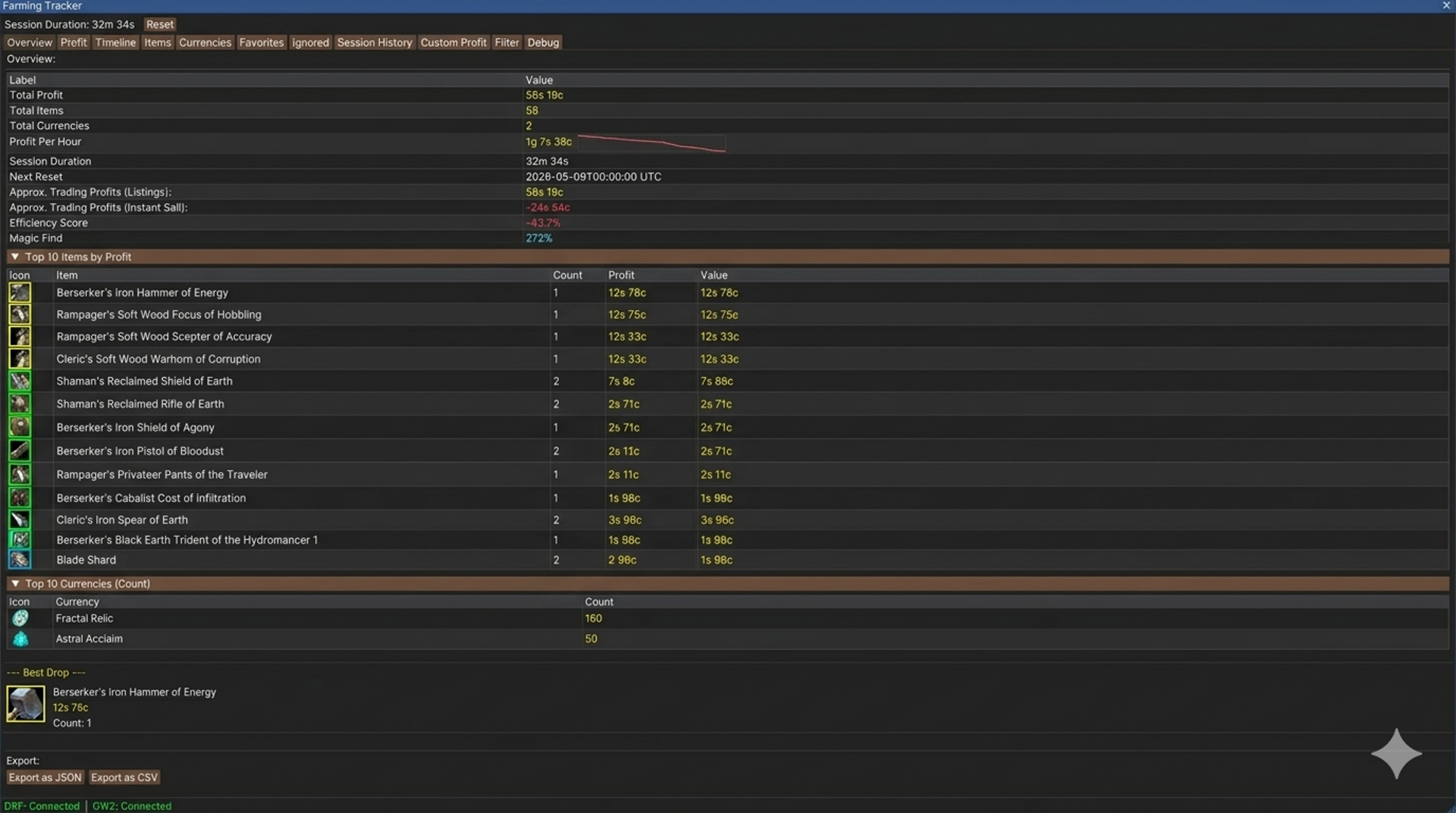
🌾 Farming Tracker
A powerful Guild Wars 2 Nexus addon that tracks items and currencies collected during farming sessions in real-time, with detailed profit calculations, advanced filtering, and customizable display options.
✨ Features
- 🔴 Real-time Tracking — Live item and currency tracking via DRF integration
- 💰 Profit Calculation — Vendor prices, Trading Post values, and custom profit overrides
- 🔧 Advanced Filtering — Filter by sell method, item type, currency, API status, and more
- 📊 Session History — Save, review, and compare past farming sessions
- ⭐ Favorites System — Quick access to your most important items and currencies
- 🚫 Ignore System — Hide items you don't want to track
- 🎨 Custom UI — List & Grid views, customizable colors, mini window overlay
- ⌨️ Hotkey Support — Quick access to main and mini windows
- 🌍 Multi-Language — Available in 18 languages
- 💾 Backup & Restore — Export and import your settings and data
- 🔔 Notifications — Custom alerts for profit goals and session milestones
- 🔄 Auto-Reset — Automatic session reset based on schedule
🌍 Supported Languages (Translated by Ai)
| 🇨🇿 Czech | 🇩🇪 German | 🇬🇧 English | 🇪🇸 Spanish | 🇫🇷 French | 🇮🇹 Italian | 🇵🇱 Polish | 🇵🇹 Portuguese |
| 🇷🇺 Russian | 🇨🇳 Chinese | 🇩🇰 Danish | 🇬🇷 Greek | 🇫🇮 Finnish | 🇭🇺 Hungarian | 🇳🇱 Dutch | 🇳🇴 Norwegian | 🇷🇴 Romanian | 🇸🇪 Swedish
📋 Requirements
Requirements:
Nexus Addon Manager - https://raidcore.gg/Nexus - Required to load the addon
DRF - https://drf.rs/ -Required for real-time item and currency data
(Thanks at this point to DRF for making something like this possible through their work.)
GW2 API Key - https://account.guildwars2.com/applications - Required for item details and Trading Post prices
GW2 API Key Permissions:
Create your API key at https://account.guildwars2.com/applications with these permissions:
account • characters • inventories • wallet • tradingpost
🚀 Installation
Via the Nexus in-game library, or:
1. Download the latest release from [GitHub](https://github.com/xLiviax-Dev/FarmingTracker/releases)
2. Place the `.dll` file in your addons folder: Guild Wars 2\addons\
3. Load the addon through Nexus Addon Manager
4. Configure your DRF Token and GW2 API Key in the settings
⚙️ Configuration
🔑 DRF Token
1. Open DRF and copy your personal token from its settings
2. Paste it into Farming Tracker settings under **Account Management**
3. Click Save
🔑 GW2 API Key
1. Visit https://account.guildwars2.com/applications
2. Create a new API key with the required permissions
3. Paste it into Farming Tracker settings under **Account Management**
4. Click Save
> Note: A valid API key must consist of exactly 9 blocks separated by hyphens (e.g., `XXXX-XXXX-XXXX-XXXX-XXXX-XXXX-XXXX-XXXX-XXXX`)
⌨️ Hotkeys
Customizable in Nexus → Keybinds:
- Action - Default Hotkey
- Main Window - `CTRL+F`
- Mini Window - `CTRL+SHIFT+M`
- Reset Session - `CTRL+SHIFT+R`
📑 Tabs Overview
Tab Description
- Summary Session - overview with DRF status, total profit, item count, and quick actions
- Profit - Detailed breakdown of vendor value, Trading Post value, and custom profit
- Timeline - Chronological view of all drops and currency changes
- Items - All tracked items with List/Grid views, right-click for actions
- Currencies - All tracked currencies including Coin, Karma, Laurels, map currencies
- Favorites - Quick access to your favorite items and currencies
- Ignored - Items and currencies you've chosen to hide
- Session - History Browse and compare past farming sessions
- Custom - Profit Manage custom profit values for specific items
- Filter - Advanced filtering options for items and currencies
- Debug - DRF/API logs, profit calculations, memory usage, and diagnostics
🎯 Filter Options
Filter items and currencies by:
- Sell Method - Vendor, Trading Post, Custom Profit
- API Knowledge - Known / Unknown by GW2 API
- Item Type - Armor, Weapon, Trinket, Bag, Container, Crafting Material, Consumable, Trophy, and more
- Currencies - Main currencies, WvW/PvP currencies, Map currencies
- Additional - Account Bound, No-sell, Favorite, Ignored, price range, count range
⏰ Auto-Reset Options
Choose when to automatically reset your session data:
- Never (manual only)
- On addon load
- Daily reset (00:00 UTC)
- Weekly reset (Monday 07:30 UTC)
- Weekly NA WvW reset (Saturday 02:00 UTC)
- Weekly EU WvW reset (Friday 18:00 UTC)
🔧 Troubleshooting
DRF not connected:
- ✅ Make sure DRF is running
- ✅ Verify your DRF Token is entered correctly in settings
- ✅ Check that DRF is transmitting data
Items show "Loading...":
- ✅ Ensure your GW2 API Key is entered with correct permissions
- ✅ Check your internet connection
- ✅ Verify the API key format (9 blocks with hyphens)
No data appearing:
- ✅ Wait a few seconds after loading into a map for DRF to transmit data
- ✅ Verify DRF connection status in the Summary tab
- ✅ Check that you're in a map where items can drop
AI Notice
This addon includes AI-generated content and/or AI-assisted code.
AI may have been used during development for tasks such as code generation, suggestions, documentation, or content creation.
While efforts are made to review and validate all AI-generated output, it may not always be fully accurate, optimal, or free of unintended behavior.
Users should be aware that:
- AI-generated components may contain errors or inconsistencies or may be unstable,
- behavior may change as the addon evolves or is updated,
- the developer remains responsible for ensuring compliance with the game's Terms of Service.
**Made with ❤️ for the Guild Wars 2 community**