Gw2-Accessibility
Various accessibility features
Todd0042
Updated
6 hours ago
AI Notice
This addon includes AI-generated content and/or AI-assisted code.
AI may have been used during development for tasks such as code generation, suggestions, documentation, or content creation. While efforts are made to review and validate all AI-generated output, it may not always be fully accurate, optimal, or free of unintended behavior.
Users should be aware that:
AI-generated components may contain errors or inconsistencies or may be unstable,
behavior may change as the addon evolves or is updated,
the developer remains responsible for ensuring compliance with the game's Terms of Service.
::NOTE FOR LINUX USERS::
Instructions for setting up TTS are in TTS_SETUP.md. Clone the repo and follow the instructions. TTS will not work natively on linux, it requires further setup.
GW2Accessibility
A Guild Wars 2 Nexus addon providing accessibility features for players with visual, auditory, motor, or cognitive impairments.
Features
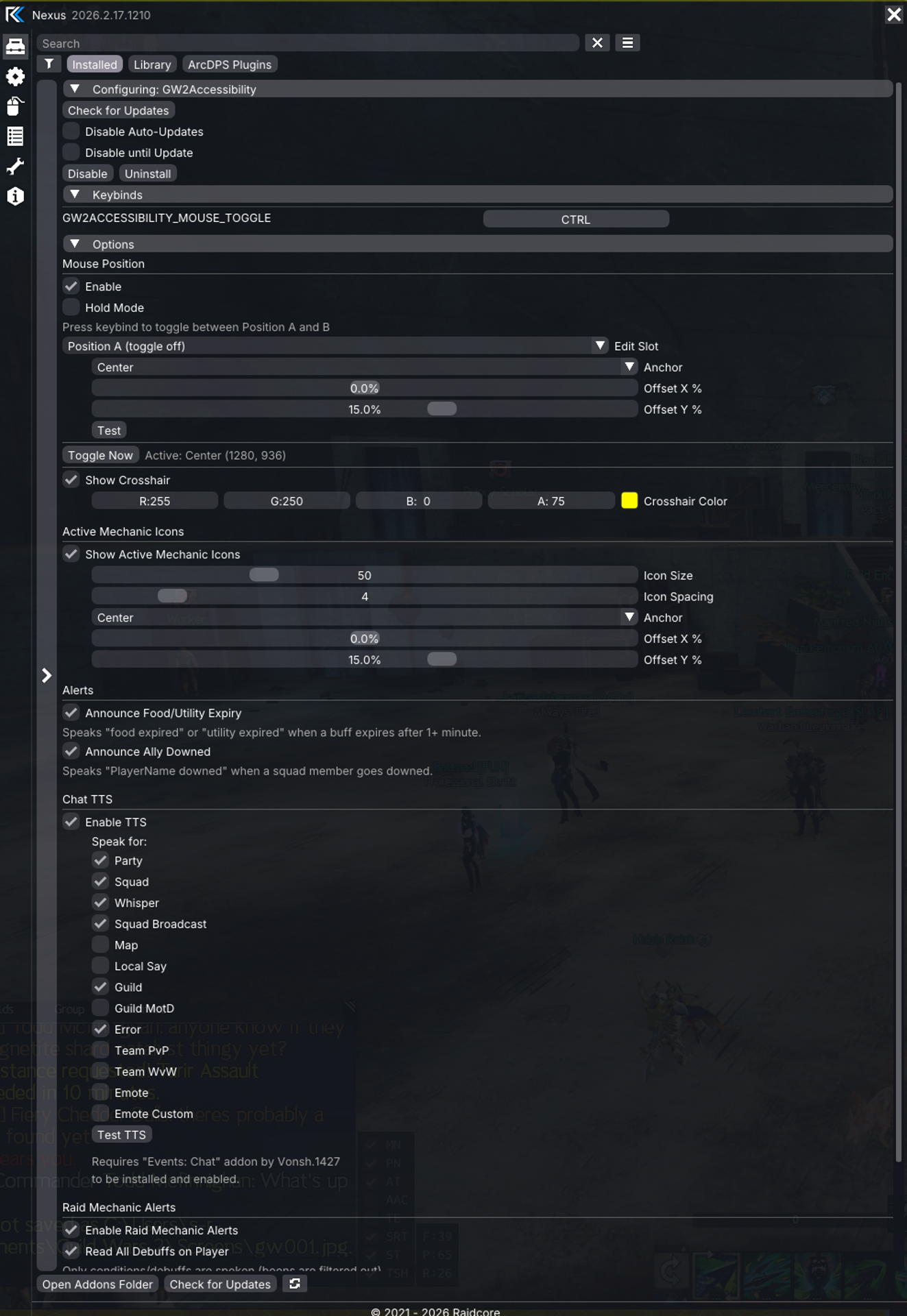
Mouse Position Management
- Toggle or hold a keybind to snap the mouse cursor between two configurable positions
- Each position has independent anchor point (9 positions) and X/Y offset settings
- Hold mode: hold keybind to go to Position B, release to return to Position A
- Toggle mode: press keybind to switch between Position A and B
Screen Crosshair
- Full-screen horizontal and vertical lines that follow your mouse cursor
- Customizable color via color picker
- Useful for players who have difficulty locating their cursor
Active Mechanic Icons
- Displays icon overlays for all configured raid mechanics currently active on your character
- Icons are fetched from the GW2 API and cached after first load
- Configurable icon size, spacing, anchor point, and offset
- Icons automatically appear when a mechanic is applied and disappear when removed or expired
Chat TTS
- Text-to-Speech for chat messages across all channels:
- Party, Squad, Map, Local, Whisper, Guild, Squad Broadcast, Guild MotD, Team PvP, Team WvW, Emotes, Error messages
- Self-filtering: ignores messages sent by your own character (detected via MumbleLink)
- Each channel can be individually enabled/disabled
- Test TTS button in settings
Raid Mechanic Alerts
- Announce configured raid mechanics via TTS when they are applied to you
- Add custom mechanics with skill ID and display name
- Each mechanic can be individually toggled on/off
- Includes built-in action-oriented TTS messages (e.g., "Corruption, get to fountain")
Read All Debuffs
- Speaks the name of every condition/debuff applied to your character
- Boons are filtered out — only conditions and debuffs are announced
- Uses a built-in mapping of ~100+ buff IDs plus the GW2 API as fallback
- Buff application tracking ensures each debuff is spoken only once per application cycle
- Cleansed debuffs are automatically cleared so re-application is announced again
Food & Utility Expiry Alerts
- Speaks "food expired" or "utility expired" when consumable buffs end
- Automatically detects food (Steak, Flatbread, Salad, Soup, Pancake) vs utility (sharpening stones, tuning crystals, maintenance oils)
- Only announces buffs that lasted 1+ minute to avoid false positives
Ally Downed Alerts
- Speaks "PlayerName downed" when a squad member goes downed
- Each player is announced only once per down cycle
- Cleared from tracking when the player is revived
WvW Map Blacklist
- All combat debuff reading is automatically silenced while on WvW maps to prevent excessive noise from enemy conditions
Comprehensive Event Logging
- All combat and chat events are logged to the Nexus log menu under "GW2Accessibility"
- Logs show the event details, whether it was spoken or ignored, and the reason for any filtering
- Useful for debugging and identifying unknown skill IDs
Requirements
- Nexus addon loader
- Events: Chat addon (by Vonsh.1427) — required for Chat TTS
- Arcdps Integration addon (bundled with Nexus) — required for combat events and mechanic alerts
Configuration
All settings are accessible through the Nexus options panel under "GW2Accessibility" and persist to config.json across game reloads.