
This addon may include or support macros. Learn More.
This addon includes AI-generated content and/or AI-assisted code. Learn More.
Gw2-Accessibility
Various accessibility features
| Visibility | Public |
| Updated | 2 months ago |
| Created | 3 months ago |
| ID | 91 |
| Signature | 0x358418C3 |
Contributors
AI Notice
This addon includes AI-generated content and/or AI-assisted code.
AI may have been used during development for tasks such as code generation, suggestions, documentation, or content creation. While efforts are made to review and validate all AI-generated output, it may not always be fully accurate, optimal, or free of unintended behavior.
Users should be aware that:
- AI-generated components may contain errors or inconsistencies or may be unstable,
- behavior may change as the addon evolves or is updated,
- the developer remains responsible for ensuring compliance with the game's Terms of Service.
# GW2Accessibility
A Guild Wars 2 Nexus addon providing accessibility features for players with visual, auditory, motor, or cognitive impairments.
## Features
### Keybind Overlay
- Displays your GW2 keybindings as an on-screen overlay during gameplay
- Reads your exported GW2 keybind XML file automatically (no manual path entry needed)
- Organized into 10 categories: **Movement, Skills, Targeting, Mounts, Squad, Camera, Screenshot, Map, UI, Templates**
- Each category can be individually shown or hidden
- Configurable **anchor point** (9 positions), **X/Y offset**, and **opacity**
- Anchor point pins the matching corner of the overlay to that screen position (e.g. Top Right → overlay's top-right corner sits at the screen's top-right)
- Skills section shows a vertical list: Weapon Skills 1–5, Healing, Utility 1–3, Elite, Special Action, Weapon Swap
### Ready Check TTS
- Speaks **"Ready Check Initiated."** when the squad leader starts a ready check
- Requires the [Unofficial Extras](https://github.com/Krappa322/arcdps_unofficial_extras_releases) ArcDPS plugin
- Toggleable independently in settings
### Mouse Position Management
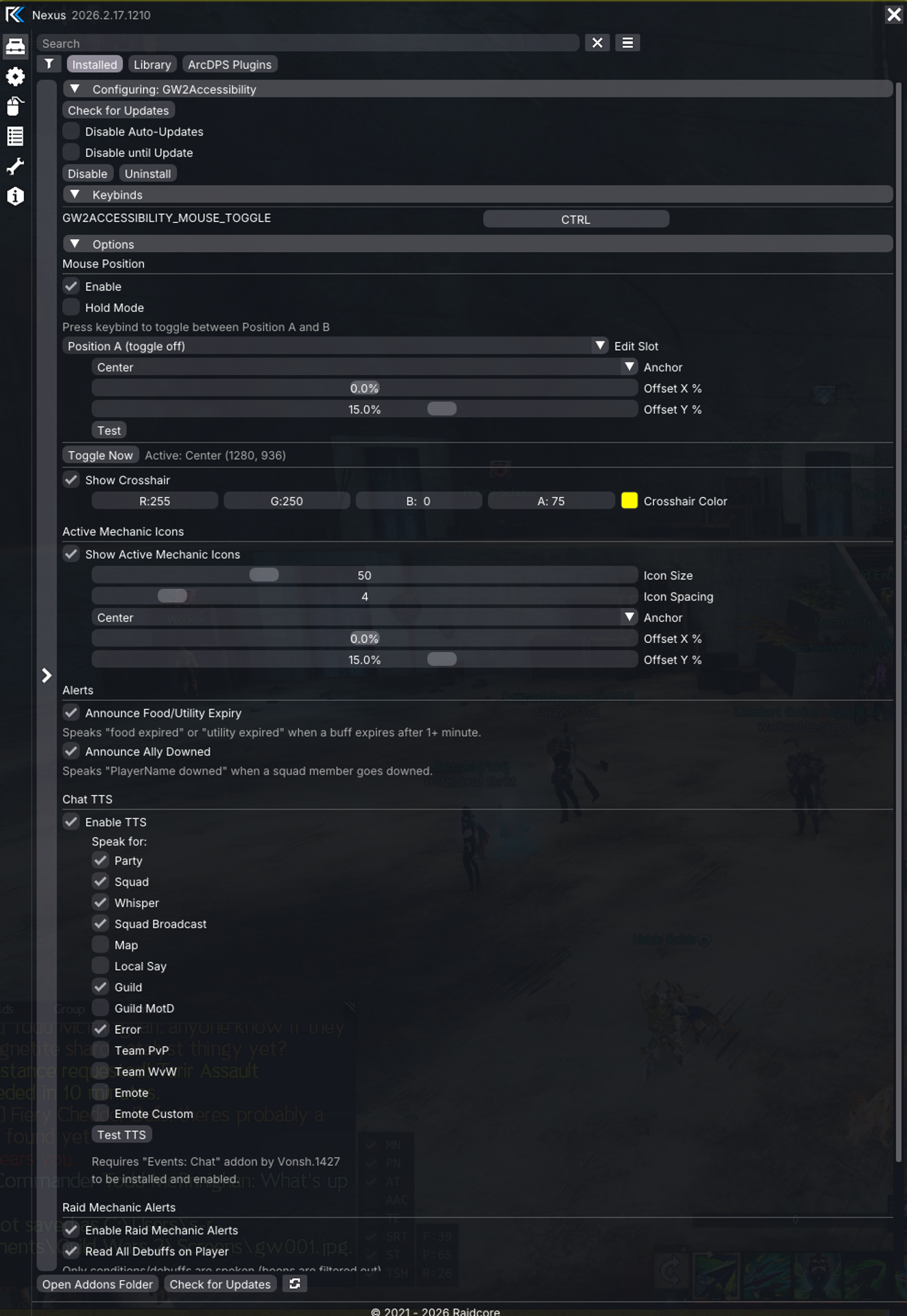
- **Toggle or hold** a keybind to snap the mouse cursor between two configurable positions
- Each position has independent **anchor point** (9 positions) and **X/Y offset** settings
- **Hold mode**: hold keybind to go to Position B, release to return to Position A
- **Toggle mode**: press keybind to switch between Position A and B
### Screen Crosshair
- Full-screen horizontal and vertical lines that follow your mouse cursor
- Customizable **color** via color picker
- Useful for players who have difficulty locating their cursor
### Active Mechanic Icons
- Displays icon overlays for all configured raid mechanics currently active on your character
- Icons are fetched from the GW2 API and **cached** after first load
- Configurable **icon size**, **spacing**, **anchor point**, and **offset**
- Icons automatically appear when a mechanic is applied and disappear when removed or expired
### Chat TTS
- Text-to-Speech for chat messages across all channels:
- Party, Squad, Map, Local, Whisper, Guild, Squad Broadcast, Guild MotD, Team PvP, Team WvW, Emotes, Error messages
- **Self-filtering**: ignores messages sent by your own character (detected via MumbleLink)
- Each channel can be individually enabled/disabled
- Test TTS button in settings
### Raid Mechanic Alerts
- Announce configured raid mechanics via TTS when they are applied to you
- Add custom mechanics with **skill ID** and **display name**
- Each mechanic can be individually toggled on/off
- Includes built-in action-oriented TTS messages (e.g., "Corruption, get to fountain")
### Read All Debuffs
- Speaks the name of every condition/debuff applied to your character
- **Boons are filtered out** — only conditions and debuffs are announced
- Uses a built-in mapping of ~100+ buff IDs plus the GW2 API as fallback
- Buff application tracking ensures each debuff is spoken only once per application cycle
- Cleansed debuffs are automatically cleared so re-application is announced again
### Food & Utility Expiry Alerts
- Speaks **"food expired"** or **"utility expired"** when consumable buffs end
- Detects food by name keywords: Steak, Soup, Salad, Flatbread, Rendang, Pie, Cake, Cookie, Bread, Stew, Chowder, Dumpling, Noodles, Rice, Tacos, Burger, Sausage, Egg, Curry, Omelet, Pancake, Waffle, Crepe, Muffin, Scone, Tart, Pudding, Candy, and more
- Detects utility consumables by name keywords: Sharpening, Crystal, Oil, Tuning, Maintenance, Writ, Thesis, Slaying, Potion, Venom, Primer, and more
- Only announces buffs that lasted 1+ minute to avoid false positives from short-duration buffs
### Ally Downed Alerts
- Speaks **"PlayerName downed"** when a party or squad member goes downed
- **Squad Only** option: only announces downed players when you are in a squad
- Each player is announced only once per down cycle
- Cleared from tracking when the player is revived
### WvW Map Blacklist
- All combat debuff reading is automatically silenced while on WvW maps to prevent excessive noise from enemy conditions
### Comprehensive Event Logging
- All combat and chat events are logged to the Nexus log menu under "GW2Accessibility"
- Logs show the event details, whether it was spoken or ignored, and the reason for any filtering
- Useful for debugging and identifying unknown skill IDs
## Requirements
- Nexus addon loader
- Events:Chat addon (by Vonsh.1427) — required for Chat TTS
**Optional:**
- ArcDPS Unofficial Extras — required for Ready Check TTS
## Installation
### Windows
1. Install Nexus addon loader
2. Place `GW2Accessibility.dll` in `Guild Wars 2\addons\`
3. Launch GW2 and open Nexus to configure
### Linux / Wine / Proton
1. Follow the Windows steps above (inside your Wine prefix)
2. Set up the TTS helper daemon for audio output — see TTS_SETUP.md in the github repo
3. Export your keybinds in-game (**Game Menu → Options → Controls → Export**) so the keybind overlay can read them
## Configuration
All settings are accessible through the Nexus options panel under "GW2Accessibility" and persist to `config.json` across game reloads.